India Post Tracking Document API
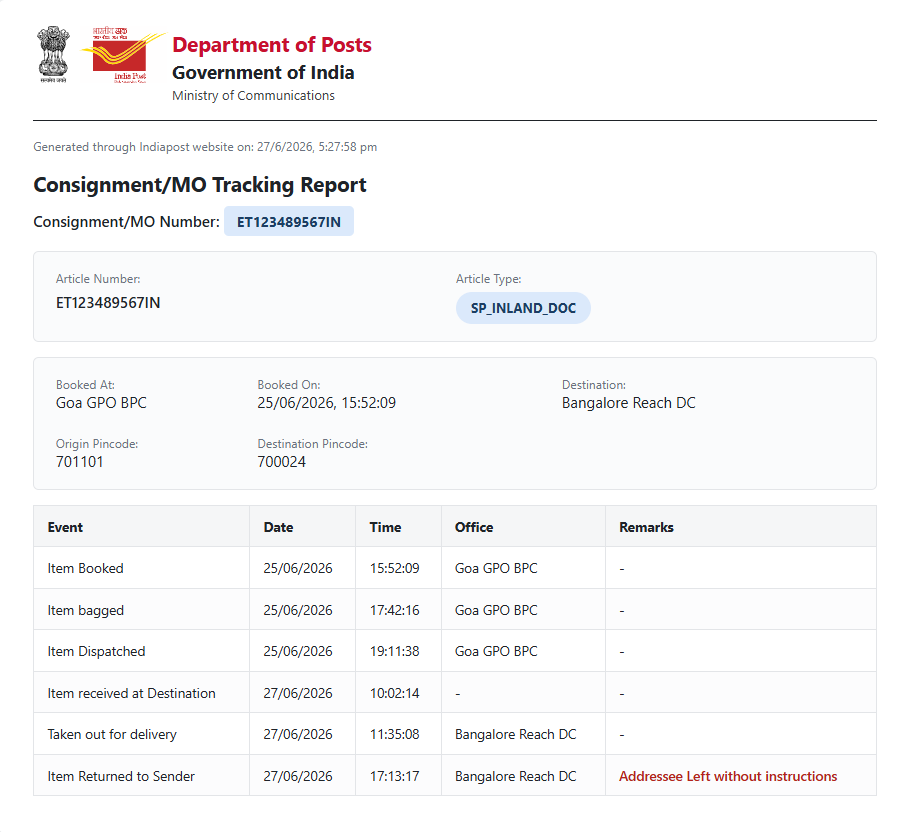
India Post Tracking API provides real-time tracking information for India Post consignments using a valid tracking number.
It returns booking details, shipment movement history, current status, and delivery information. The API supports tracking
for Speed Post, Registered Post, and other India Post postal services.
Request URL
POST
https://api.jails.co.in/api/v1/track/docs/indiapost
Request Body Parameters
| Type |
Name |
Optional |
Description |
| String |
articleNumber |
Required |
The 13-digit Article Number for provided By India Post. |
Sample Request Payload
{
  "articleNumber": "ET123489567IN"
}
Sample Code
$curl = curl_init();

curl_setopt_array($curl, array(
  CURLOPT_URL => 'https://api.jails.co.in/api/v1/track/docs/indiapost',
  CURLOPT_RETURNTRANSFER => true,
  CURLOPT_ENCODING => '',
  CURLOPT_MAXREDIRS => 10,
  CURLOPT_TIMEOUT => 0,
  CURLOPT_FOLLOWLOCATION => true,
  CURLOPT_HTTP_VERSION => CURL_HTTP_VERSION_1_1,
  CURLOPT_CUSTOMREQUEST => 'POST',
  CURLOPT_POSTFIELDS =>'{
  "articleNumber": "ET123489567IN"
}',
  CURLOPT_HTTPHEADER => array(
    'Content-Type: application/json'
  ),
));

$response = curl_exec($curl);

curl_close($curl);
echo $response;
import requests
import json

url = "https://api.jails.co.in/api/v1/track/docs/indiapost"

payload = json.dumps({
  "articleNumber": "ET123489567IN"
})
headers = {
  'Content-Type': 'application/json'
}

response = requests.request("POST", url, headers=headers, data=payload)

print(response.text)
var client = new HttpClient();
var request = new HttpRequestMessage(HttpMethod.Post, "https://api.jails.co.in/api/v1/track/docs/indiapost");
var content = new StringContent("{\r\n  \"articleNumber\": \"ET123489567IN\"\r\n}", null, "application/json");
request.Content = content;
var response = await client.SendAsync(request);
response.EnsureSuccessStatusCode();
Console.WriteLine(await response.Content.ReadAsStringAsync());
Sample Response
Sample response for valid document
Error Response
| Parameter |
Type |
Description |
| status |
Number |
Unique error codes for different errors. Always available. |
| message |
String |
Error message describing the error. Always Available. |
| error |
Boolean |
True / False for different errors. Always available. |
Error Codes
| HTTP Status |
Error Code |
Error Message |
| 400 |
4001 |
Malformed data or missing required parameter values. |
| 400 |
4002 |
Invalid Article Number Found!. |
| 503 |
5001 |
Request could not be processed. Please try again later. |
Sample Error Response
{
  "message": "Malformed data or missing required parameter values.",
  "status": 4001,
  "error": True
}